Second Caller
Thought about the biggest frustrations of many iOS users when receiving a second call. Based on Apple's HIG ↗
Thought about the biggest frustrations of many iOS users when receiving a second call. Based on Apple's HIG ↗
Overview
Overview
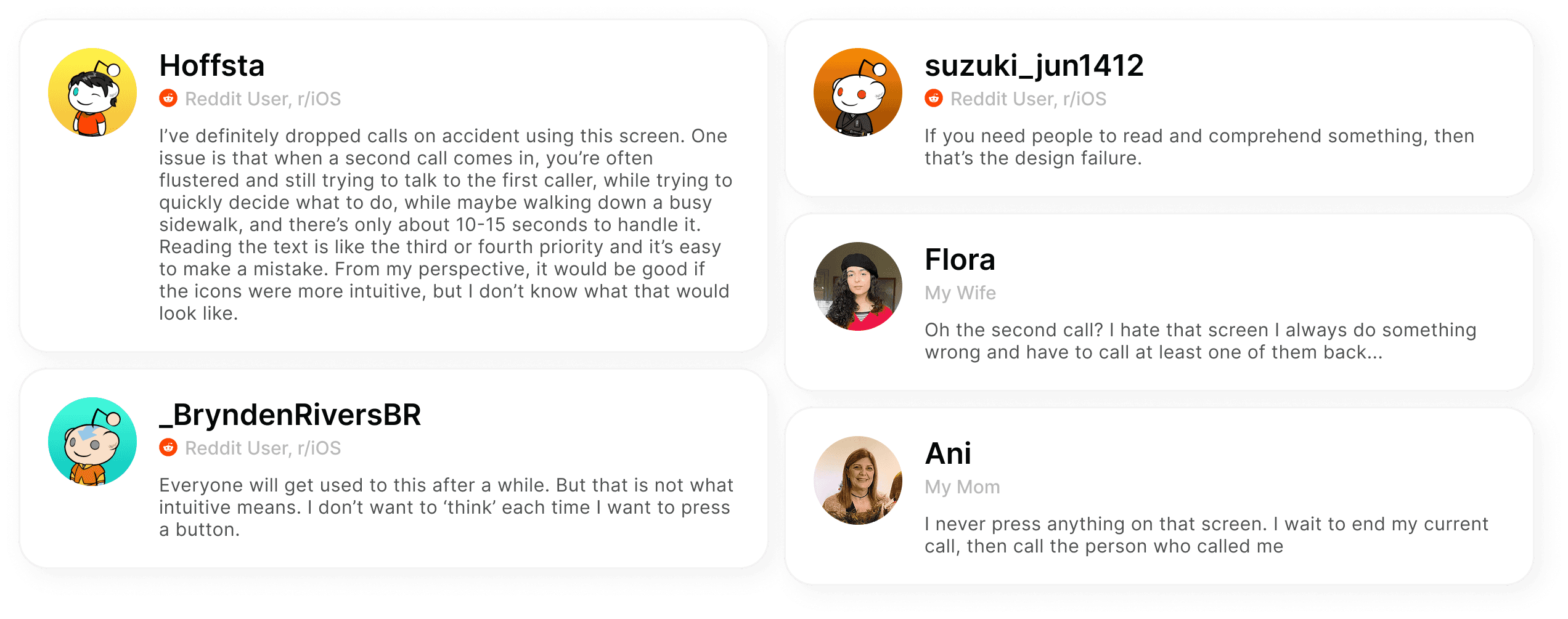
After being approached by the support specialist, we wanted to understand wether this issue was a recurring pain-point amongst users, and to ensure we weren’t designing in vacuum, we wanted to see real world comments regarding the issue.
After being approached by the support specialist, we wanted to understand wether this issue was a recurring pain-point amongst users, and to ensure we weren’t designing in vacuum, we wanted to see real world comments regarding the issue.
By starting our research process with direct user sentiment, we ensured that the redesign had its base in clearly acknowledging the real-world issue causing degraded usability in high-pressure, time-sensitive settings.
By starting our research process with direct user sentiment, we ensured that the redesign had its base in clearly acknowledging the real-world issue causing degraded usability in high-pressure, time-sensitive settings.

PM Defined Business Goals
PM Defined Business Goals
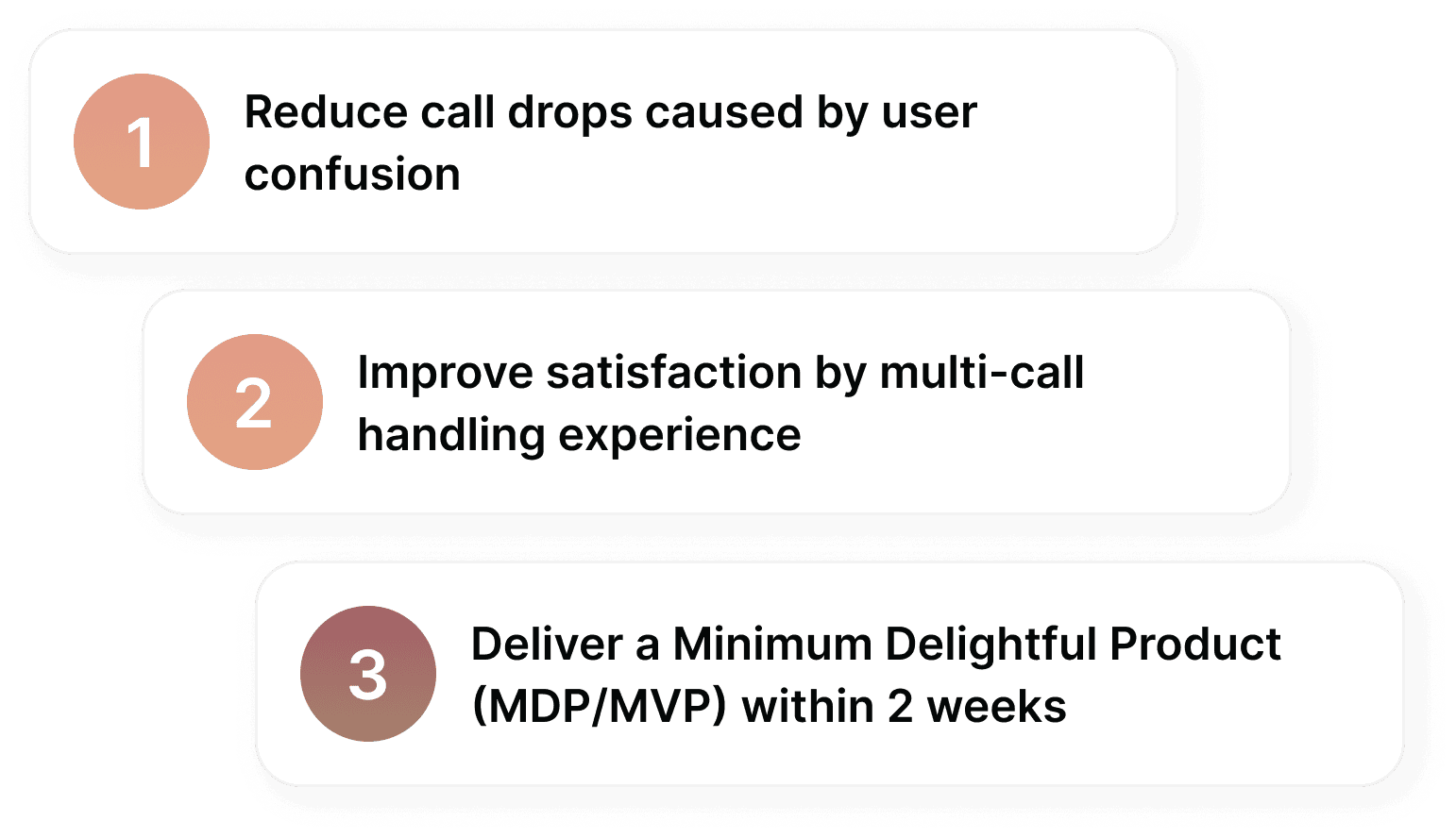
The product manager was responsible to quickly draft business goals that need to be addressed with the design process. During this, I collaborated with the PM on different stages.
The product manager was responsible to quickly draft business goals that need to be addressed with the design process. During this, I collaborated with the PM on different stages.

Competitor Analysis
Competitor Analysis
With the problem validated we felt comfortable enough to move to the deeper research to examine how competitor handle second call scenarios. Our goal here was not only to map out the different features that others offered, but to extract design principles that would aid in the future solution for the iOS second call screen in the ideation phase.
With the problem validated we felt comfortable enough to move to the deeper research to examine how competitor handle second call scenarios. Our goal here was not only to map out the different features that others offered, but to extract design principles that would aid in the future solution for the iOS second call screen in the ideation phase.
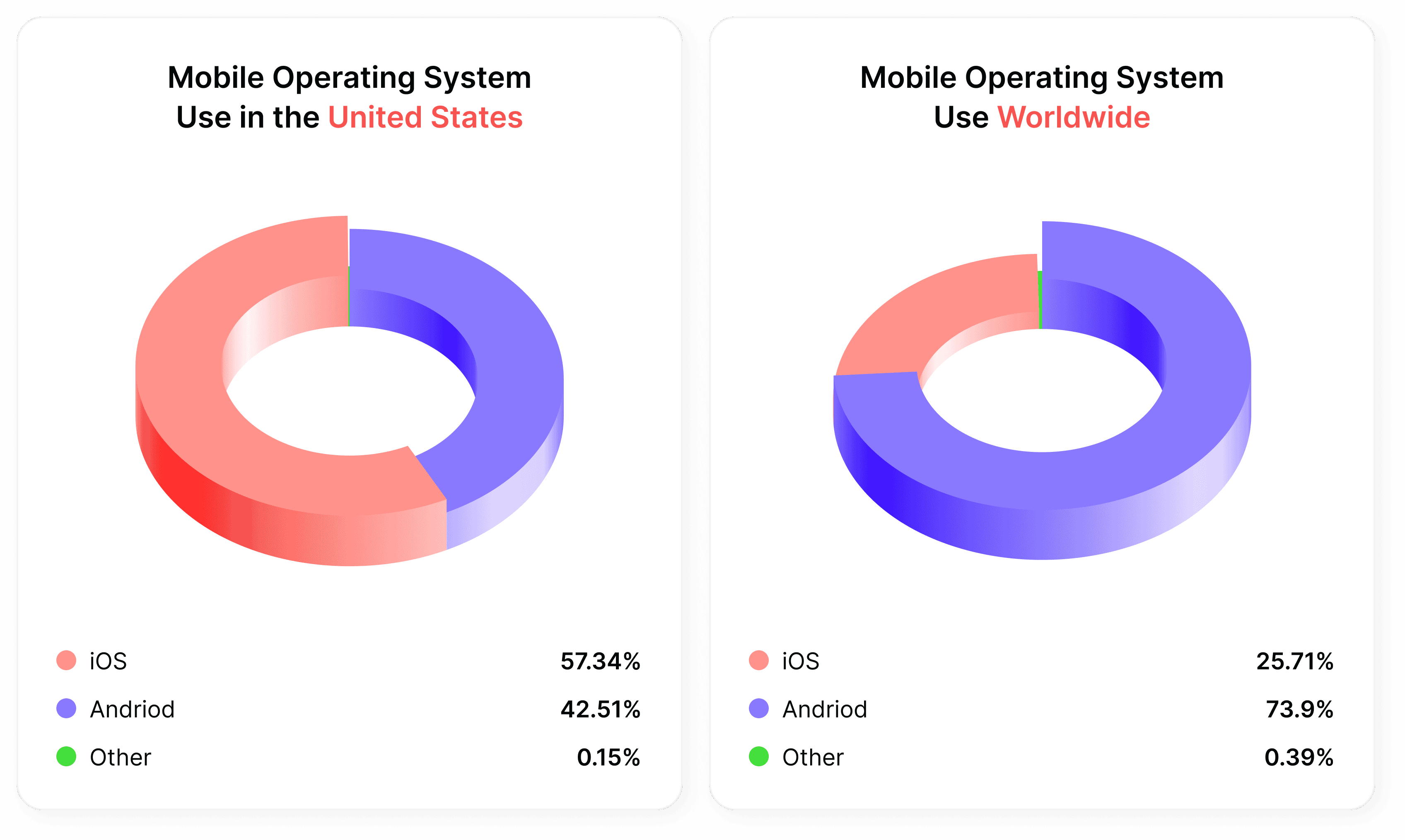
Although the data shows that iOS is the mostly used OS in the USA, Android is not that far behind, moreover, globally, Android users exceed iOS users substantially. This doesn’t necessarily mean that the solution to this issue is addressed better within the Android OS, but we should definitely have a look and investigate their flow for a better understanding overall.
Although the data shows that iOS is the mostly used OS in the USA, Android is not that far behind, moreover, globally, Android users exceed iOS users substantially. This doesn’t necessarily mean that the solution to this issue is addressed better within the Android OS, but we should definitely have a look and investigate their flow for a better understanding overall.

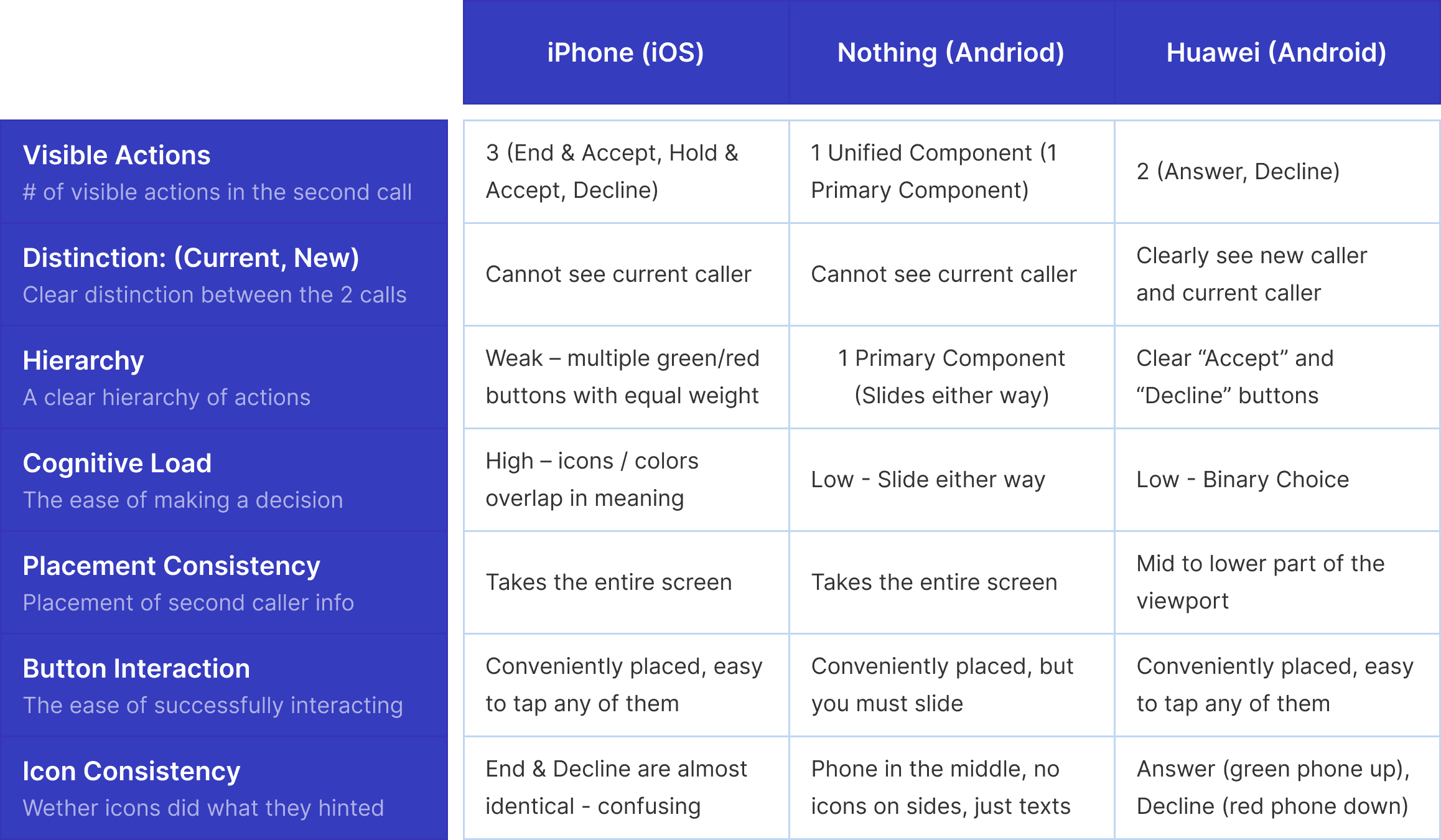
After investigating what each competitor offers in times of receiving the second call, it was evident that we had to measure their performance on some key aspects to clearly see the things that are handled effectively and the aspects that still can be improved. These insights will weigh in later, when we start thinking of solutions to improve our current iOS screen
After investigating what each competitor offers in times of receiving the second call, it was evident that we had to measure their performance on some key aspects to clearly see the things that are handled effectively and the aspects that still can be improved. These insights will weigh in later, when we start thinking of solutions to improve our current iOS screen

Spider Chart
for Stakeholders
Spider Chart
for Stakeholders
Getting a visual representation of the competitor analysis that sums up the overall state of the iOS solution when compared to other Android solutions in the market used daily
Getting a visual representation of the competitor analysis that sums up the overall state of the iOS solution when compared to other Android solutions in the market used daily
With this spider chart, we were able to communicate the results of our competitor analysis more visually which helps us communicate our findings to other stakeholders and product people.
With this spider chart, we were able to communicate the results of our competitor analysis more visually which helps us communicate our findings to other stakeholders and product people.
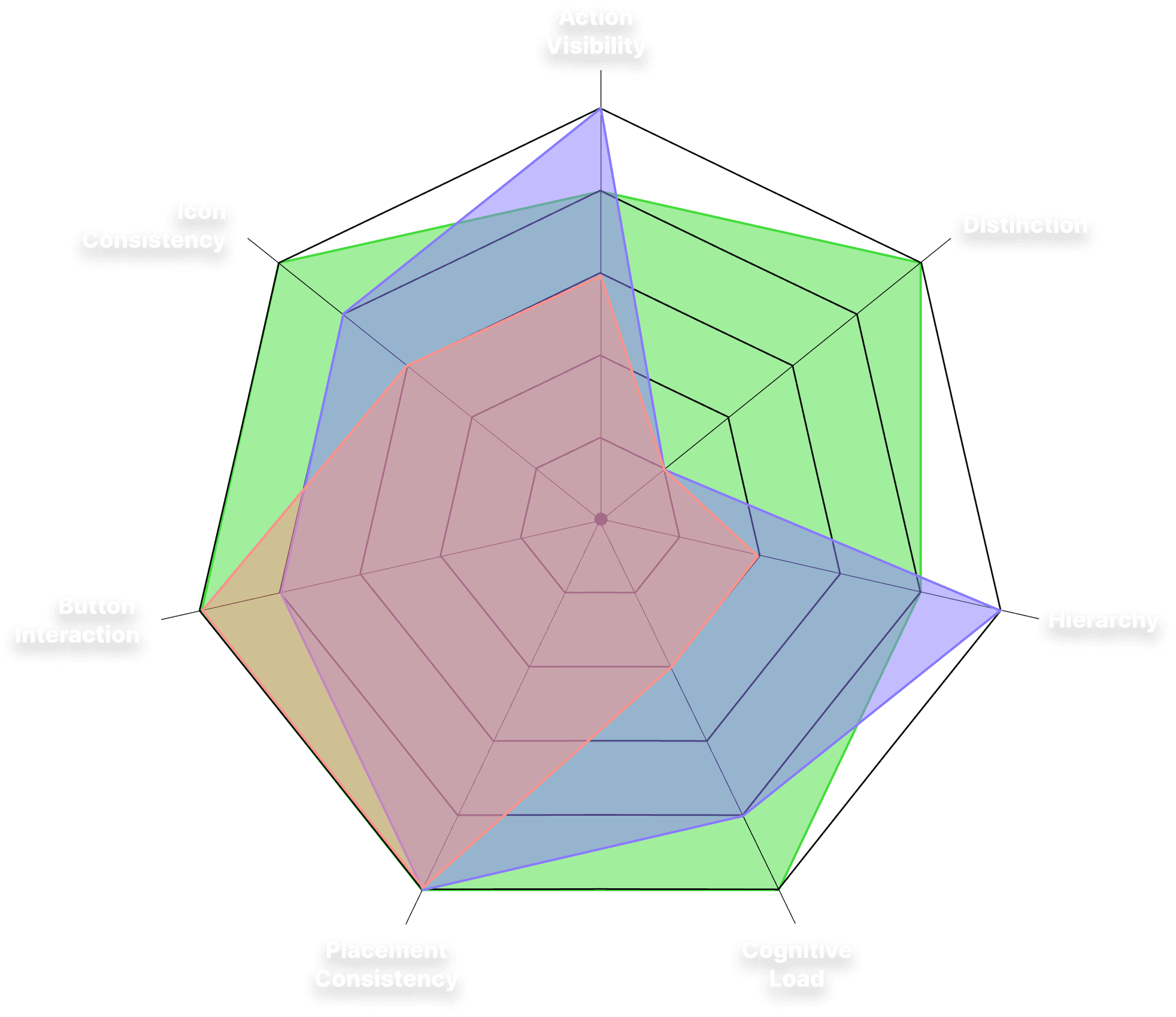
iOS
Nothing (Android)
Huawei (Android)
iOS
Nothing (Android)
Huawei (Android)
Design Heuristics for a Second Caller
Design Heuristics for a Second Caller
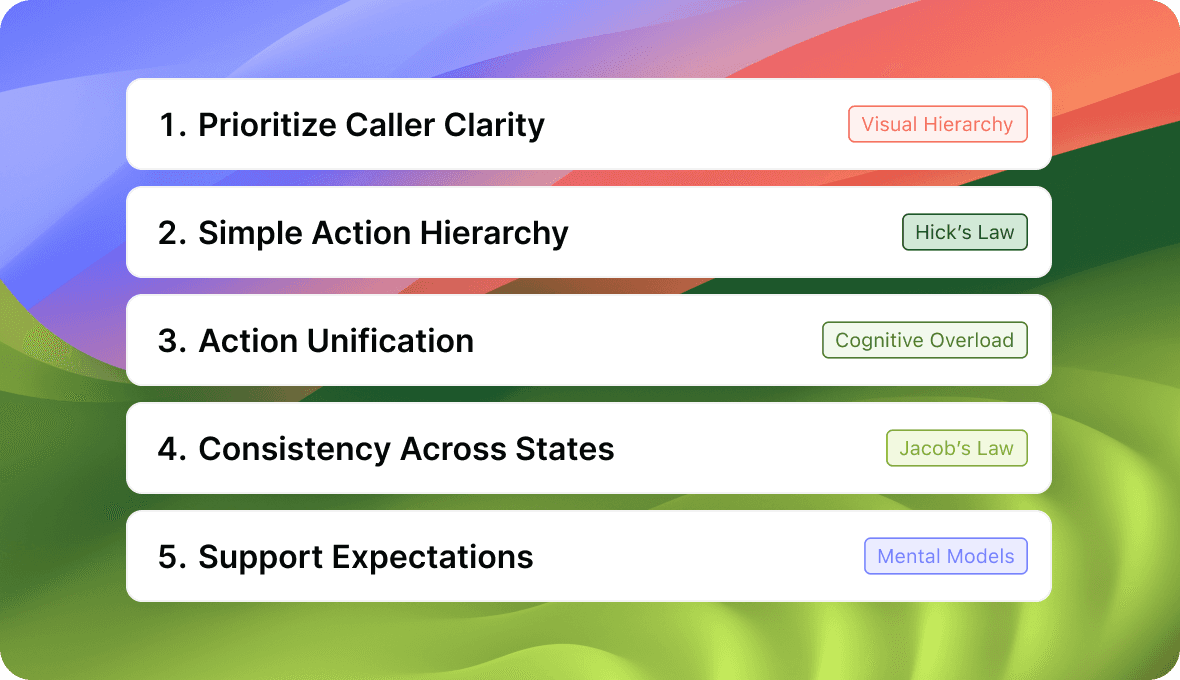
All this competitor analysis comes to an end we had a few global heuristics that were clearly evident, and in terms of involving other teams when presenting how we got to the solution, these heuristics are the main points to articulate
All this competitor analysis comes to an end we had a few global heuristics that were clearly evident, and in terms of involving other teams when presenting how we got to the solution, these heuristics are the main points to articulate
Understanding
The User
Understanding The User
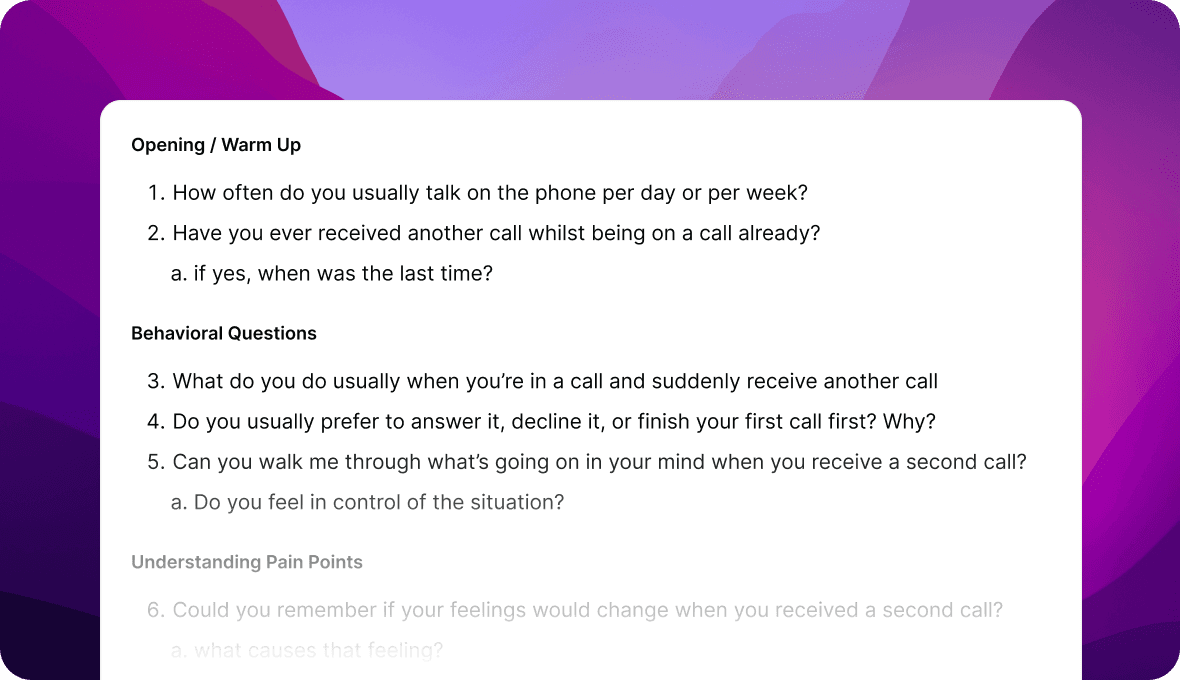
In the second stage, we conducted a real world, qualitative user research with two participants (Mom, and Wife) to better understand their behaviors, pain points, and expectations when receiving their second call. We decided not to do an empathy map since it’s value emerges with larger data sets, and instead have grouped their answers into an affinity diagram with their respective themes.
In the second stage, we conducted a real world, qualitative user research with two participants (Mom, and Wife) to better understand their behaviors, pain points, and expectations when receiving their second call. We decided not to do an empathy map since it’s value emerges with larger data sets, and instead have grouped their answers into an affinity diagram with their respective themes.
Creating an Affinity Diagram
Creating an Affinity Diagram
With all the real world insights from the two user interviews we did, and with this affinity diagram, we felt confident to move to the last stage of the research plan, which was to create a persona that depicts the users we have been working with, and to formulate a problem statement that will be our main focus in the coming stages.
With all the real world insights from the two user interviews we did, and with this affinity diagram, we felt confident to move to the last stage of the research plan, which was to create a persona that depicts the users we have been working with, and to formulate a problem statement that will be our main focus in the coming stages.
Persona & Problem Statement
With all the real world insights from the two user interviews we did, and with this affinity diagram, we felt confident to move to the last stage of the research plan, which was to create a persona that depicts the users we have been working with, and to formulate a problem statement that will be our main focus in the coming stages.
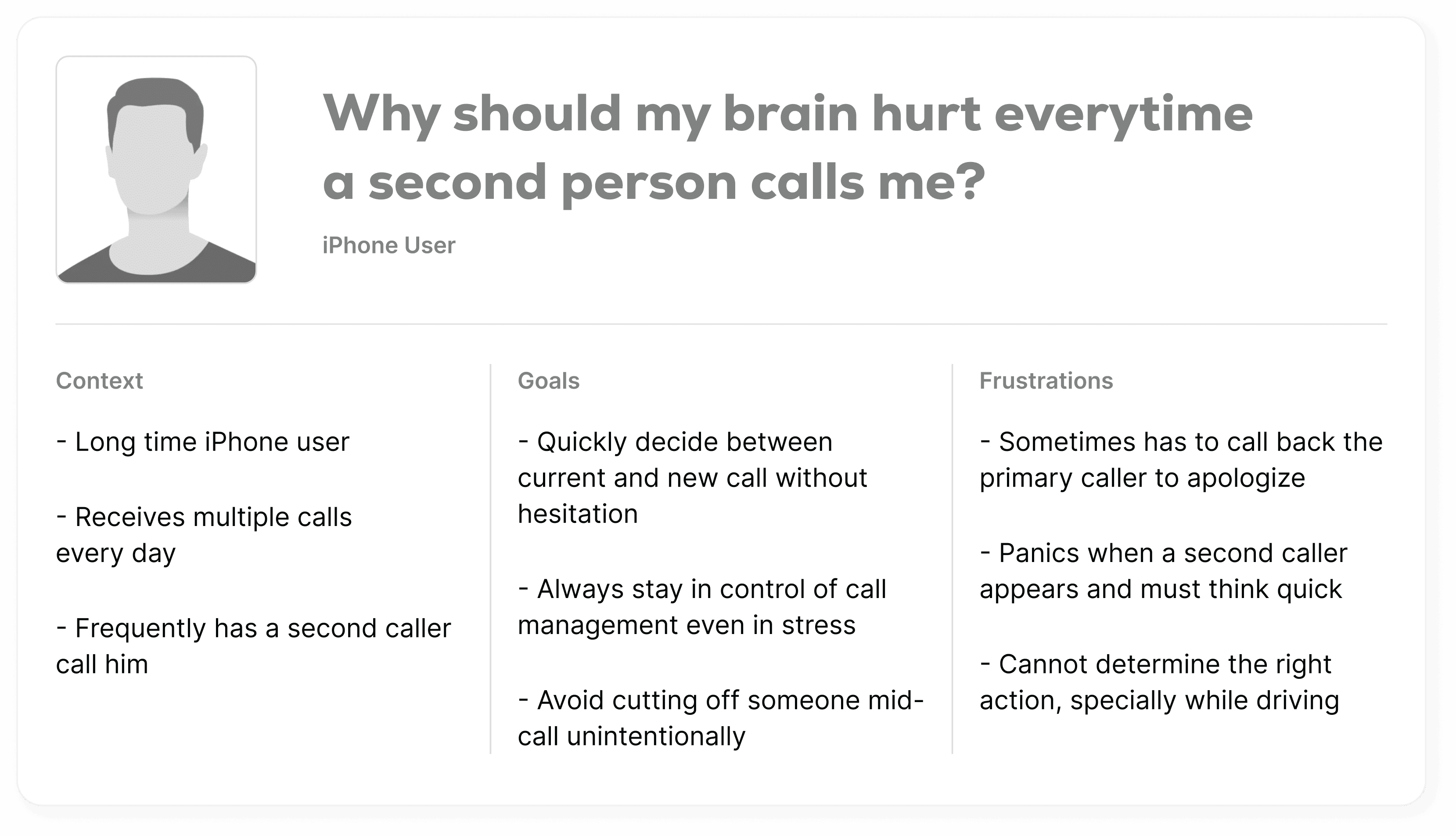
We didn’t do any of the fake additions in the time that we had. Keeping in mind that we needed a solution that was an MVP and could be delivered quickly, we created a lean persona that summed up our research and helped us frame the problems we were facing.

Why should my brain hurt every time a second person calls me?
Context
Long time iPhone user
Receives multiple calls every day
Frequently has a second caller call him
Goals
Quickly decide between current and new call without hesitation
Always stay in control of call management even in stress
Avoid cutting off someone mid-call unintentionally
Frustrations
Sometimes has to call back the primary caller to apologize
Panics when a second caller appears and must think quick
Cannot determine the right action, specially while driving
Problem Statement
iPhone users who receive multiple calls at the same time often feel panic and frustration, because the second call screen is structured in a way that leads to mistakes and unintended actions.
Persona & Problem Statement
With all the real world insights from the two user interviews we did, and with this affinity diagram, we felt confident to move to the last stage of the research plan, which was to create a persona that depicts the users we have been working with, and to formulate a problem statement that will be our main focus in the coming stages.
We didn’t do any of the fake additions in the time that we had. Keeping in mind that we needed a solution that was an MVP and could be delivered quickly, we created a lean persona that summed up our research and helped us frame the problems we were facing.

iPhone users who receive multiple calls at the same time often feel panic and frustration, because the second call screen is structured in a way that leads to mistakes and unintended actions.
Ideation Kick-Off!
Ideation Kick-Off
With solid research complete and alignment of all findings with the product, it was time to take into consideration that work, and start the ideation process.
With solid research complete and alignment of all findings with the product, it was time to take into consideration that work, and start the ideation process.
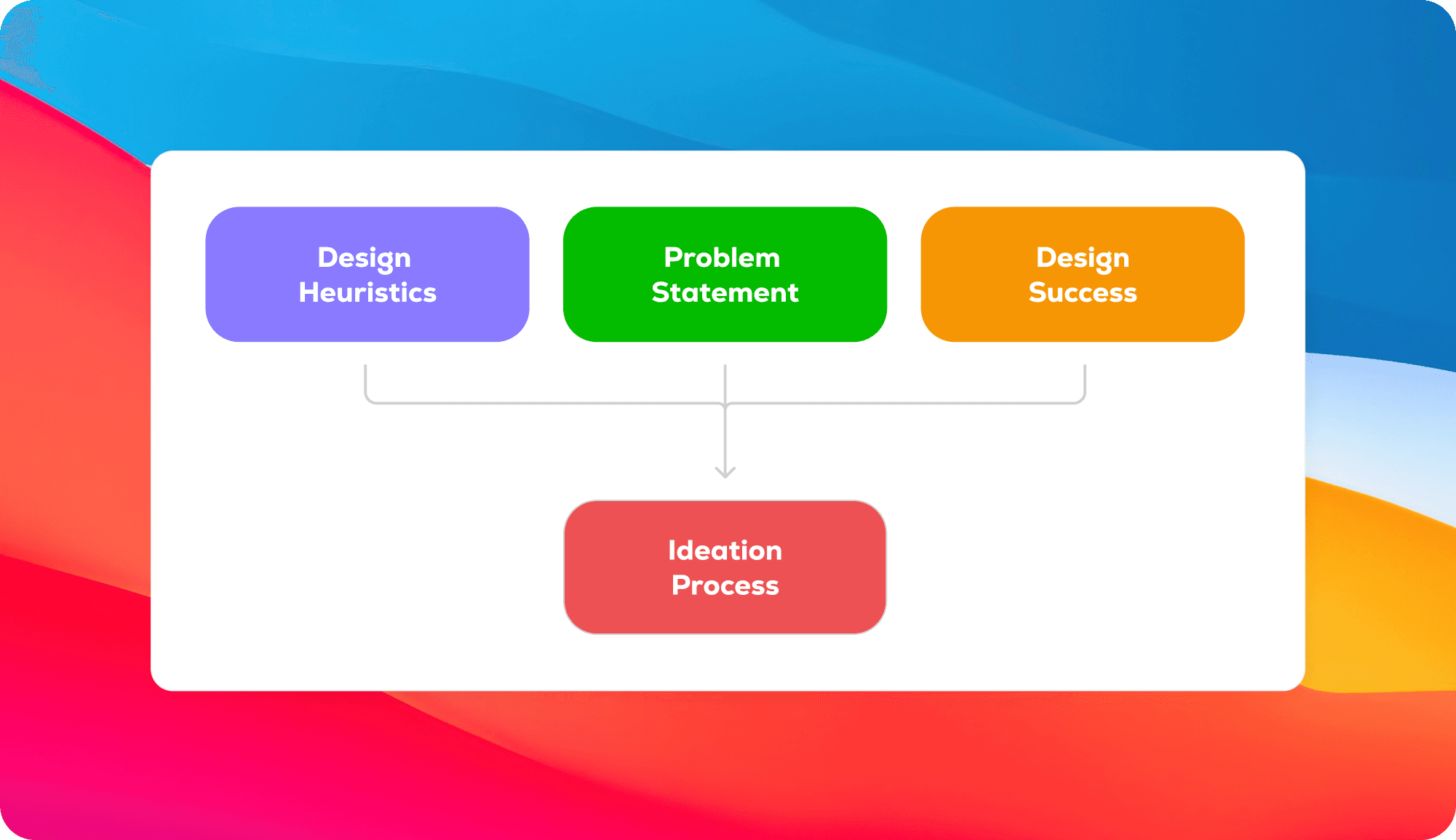
To remind us of what are the things to focus on, we put at the top of our drawing boards the design heuristics form the competitor analysis, the design success goals, and the problem statement. By doing this, we always had in front of us, in plain sight, the key guiding points of the research process.
To remind us of what are the things to focus on, we put at the top of our drawing boards the design heuristics form the competitor analysis, the design success goals, and the problem statement. By doing this, we always had in front of us, in plain sight, the key guiding points of the research process.
Paper Wireframes
Paper Wireframes
With all the real world insights from the two user interviews we did, and with this affinity diagram, we felt confident to move to the last stage of the research plan, which was to create a persona that depicts the users we have been working with, and to formulate a problem statement that will be our main focus in the coming stages.
With all the real world insights from the two user interviews we did, and with this affinity diagram, we felt confident to move to the last stage of the research plan, which was to create a persona that depicts the users we have been working with, and to formulate a problem statement that will be our main focus in the coming stages.
We didn’t do any of the fake additions in the time that we had. Keeping in mind that we needed a solution that was an MVP and could be delivered quickly, we created a lean persona that summed up our research and helped us frame the problems we were facing.
We didn’t do any of the fake additions in the time that we had. Keeping in mind that we needed a solution that was an MVP and could be delivered quickly, we created a lean persona that summed up our research and helped us frame the problems we were facing.

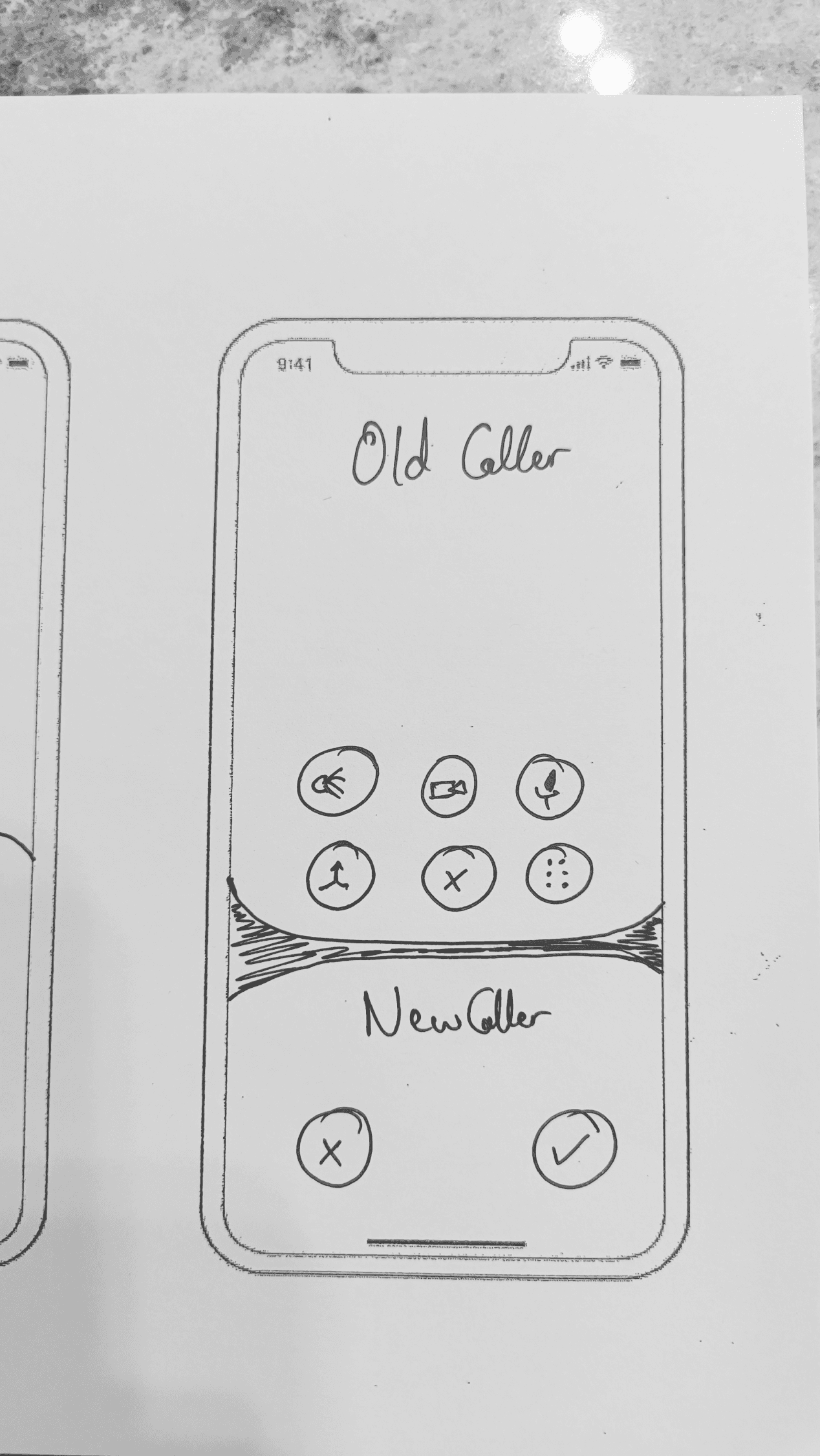
Pros
Sees both callers
Does not lose functionalities of the old caller
Cons
Too many buttons increase cognitive load
No Clear Primary Caller
Unnatural division, makes user to “pick a side”
Not in sync with the iOS’s one-caller-primary pattern
Heuristics
Caller Clarity
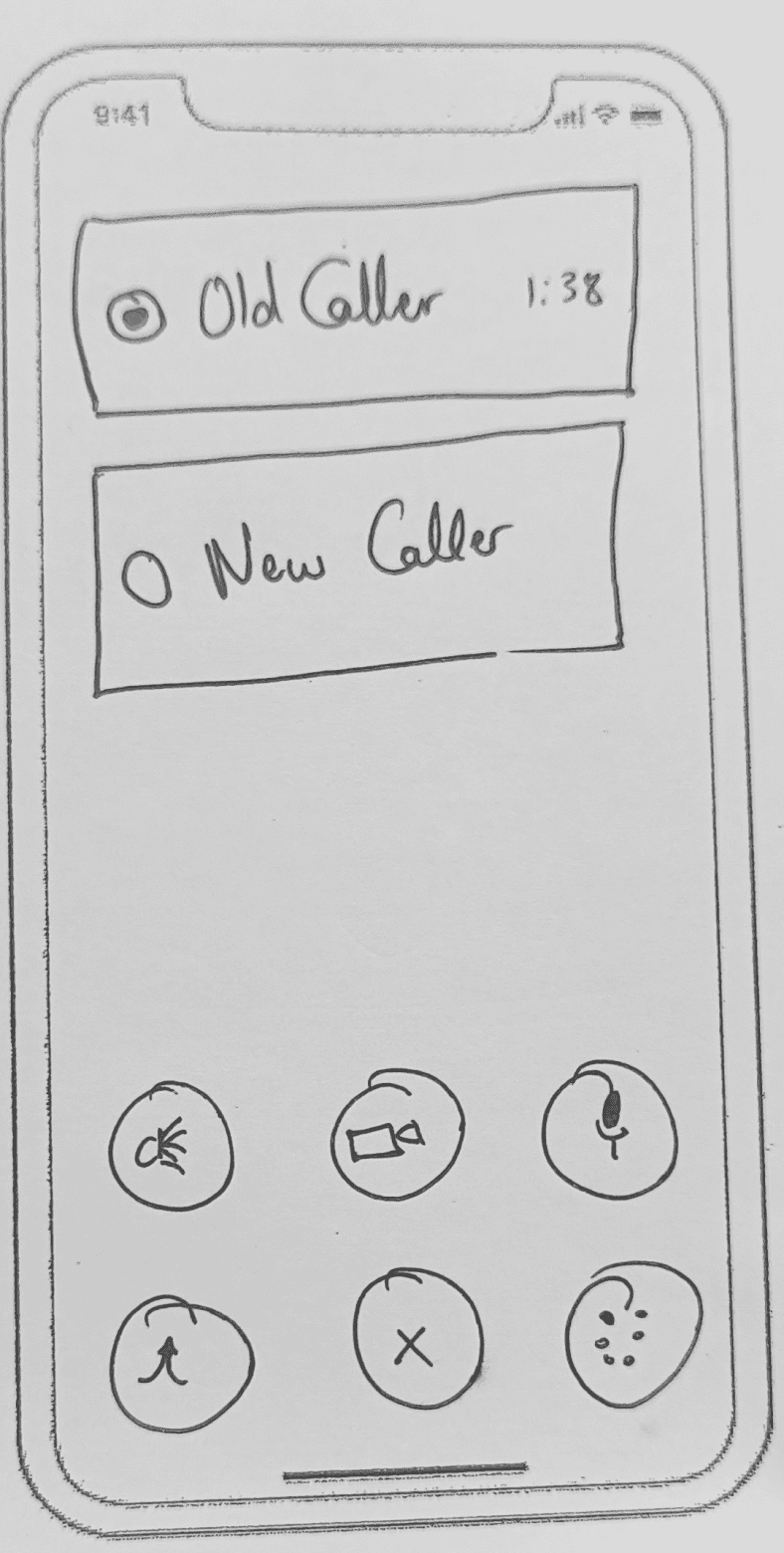
Pros
Sees both callers
Cleaner layout than splitting the screen
Call controls stay in the same zone always
Cons
Sees controls only related to the old “current” caller, until choosing the new caller
Primary/Secondary hierarchy is unclear
Users wouldn’t know what controls does the new caller have until tapping on them
Not in sync with the iOS’s one-caller-primary pattern
Heuristics
Caller Clarity
Consistency Across States
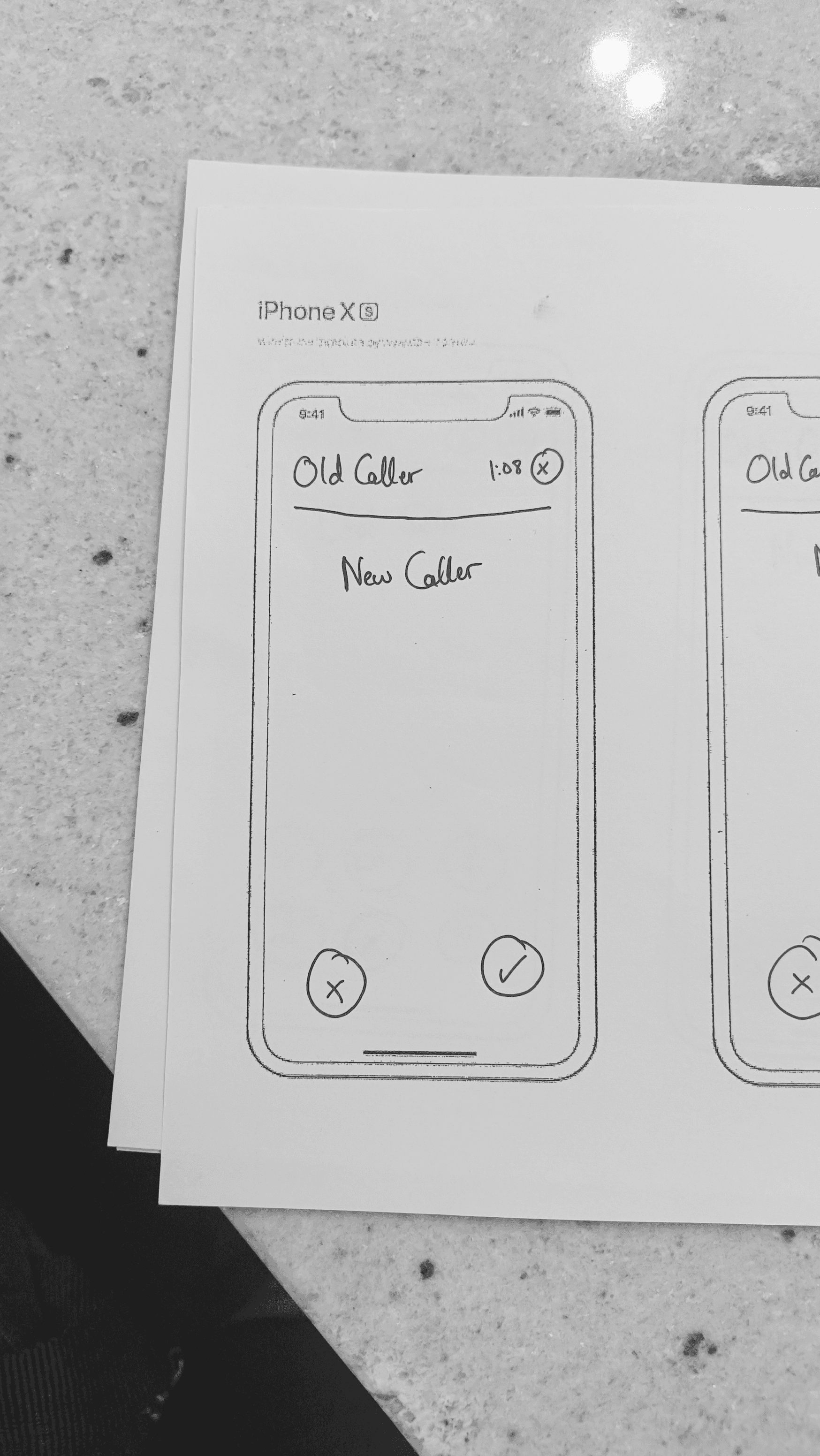
Pros
Sees both callers
Binary choice
In sync with the iOS’s one-caller-primary pattern
Familiar UI (Same as one call)
Cons
No Flexibility - No option of “End & Accept” and “Hold & Accept”
Heuristics
Caller Clarity
Simple Action Hierarchy
Consistency Across States
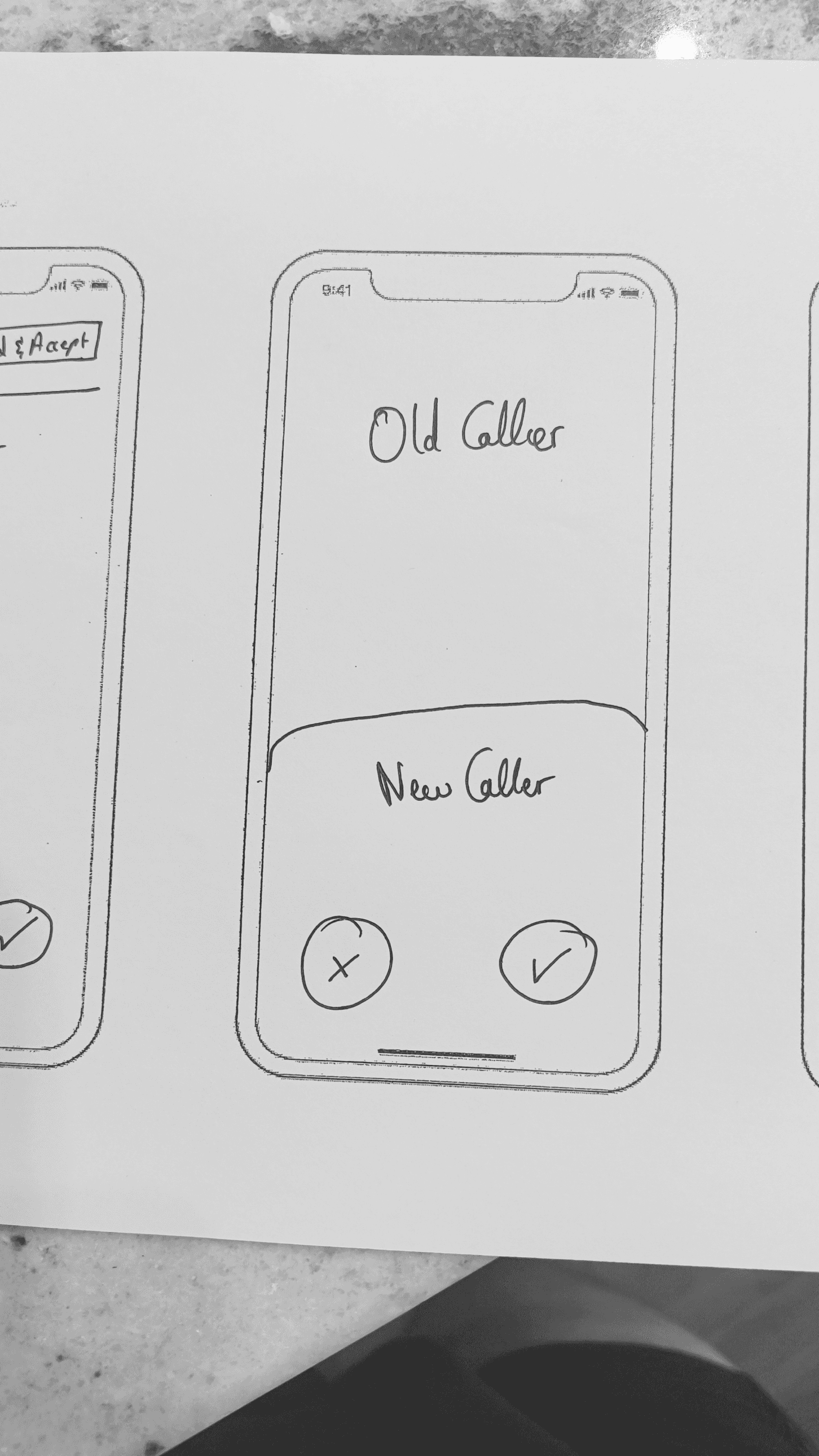
Pros
Sees both callers
Binary choice
In sync with the iOS’s one-caller-primary pattern
Familiar UI (Same as one call)
Cons
No Flexibility - No option of “End & Accept” and “Hold & Accept”
Not in sync with the iOS design language
Heuristics
Caller Clarity
Simple Action Hierarchy
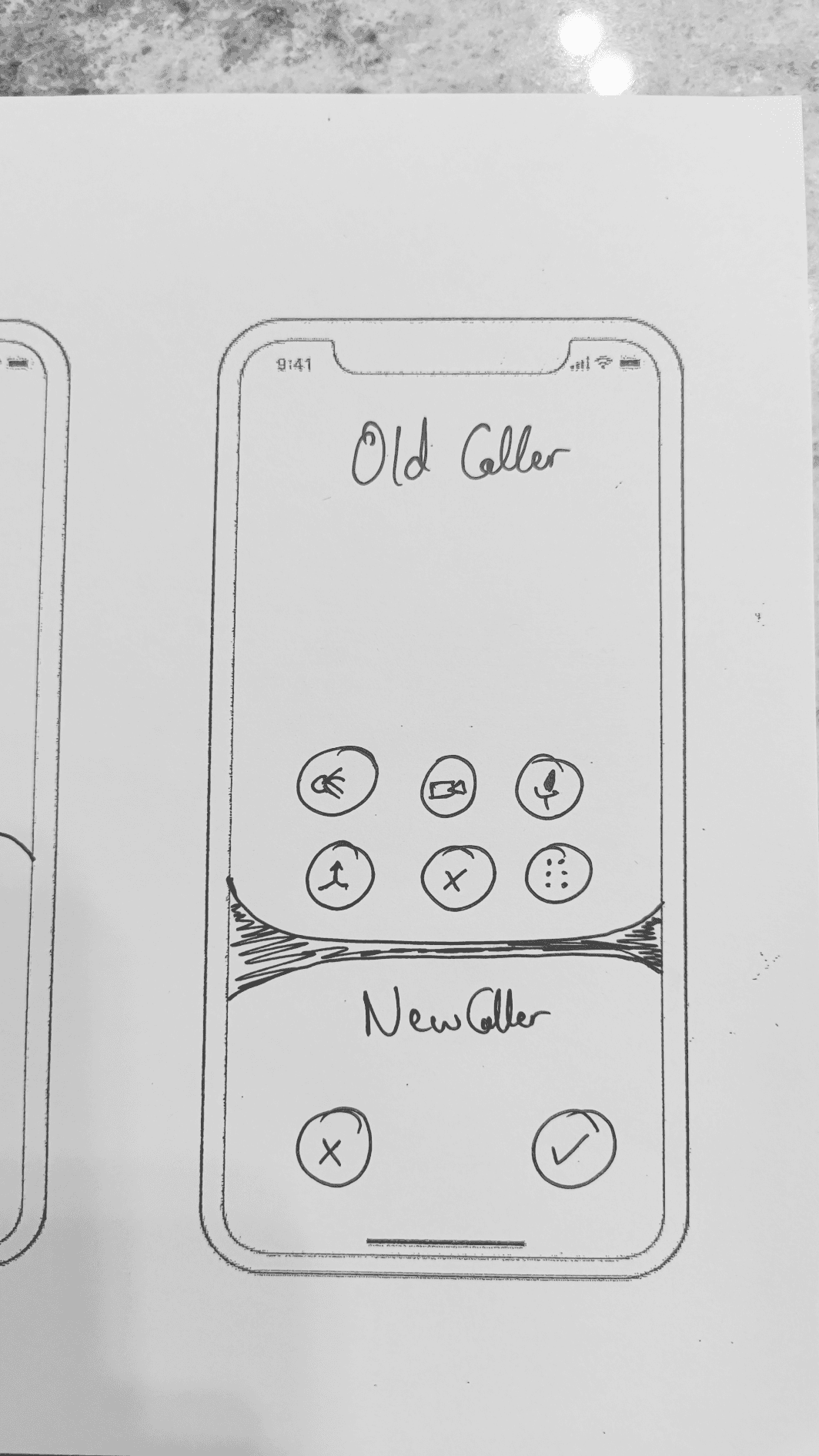
Pros
Sees both callers
Does not lose functionalities of the old caller
Cons
Too many buttons increase cognitive load
No Clear Primary Caller
Unnatural division, makes user to “pick a side”
Not in sync with the iOS’s one-caller-primary pattern
Heuristics
Caller Clarity
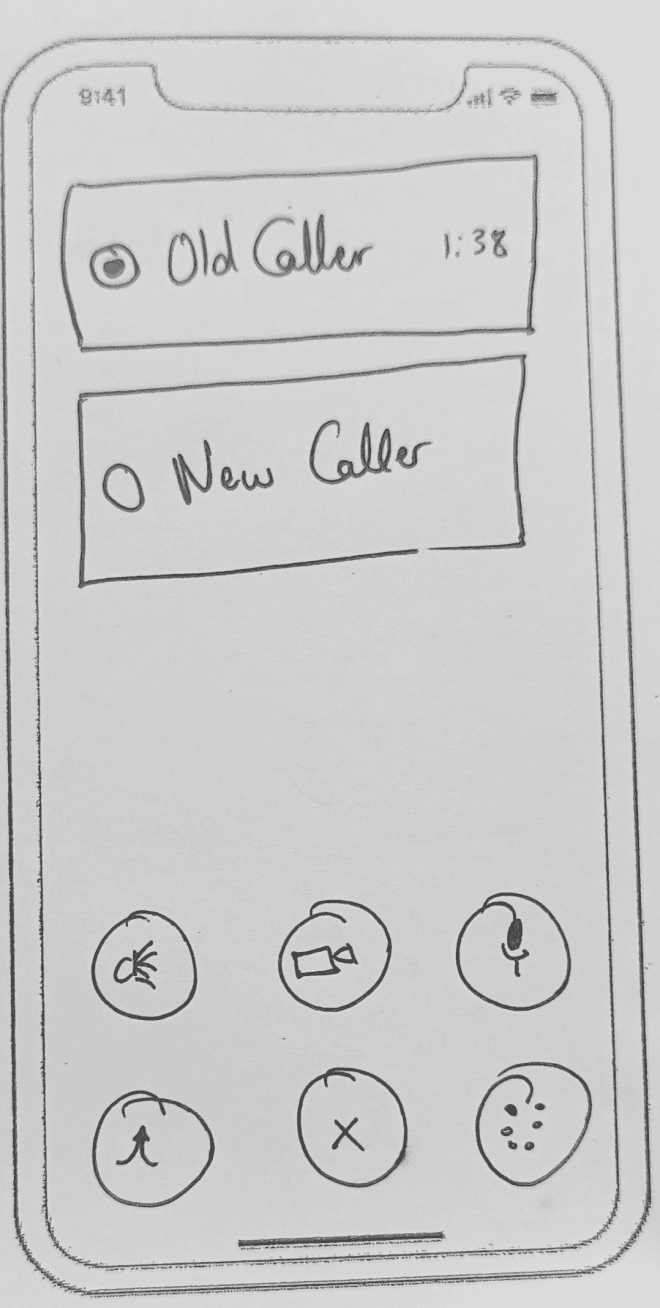
Pros
Sees both callers
Cleaner layout than splitting the screen
Call controls stay in the same zone always
Cons
Sees controls only related to the old “current” caller, until choosing the new caller
Primary/Secondary hierarchy is unclear
Users wouldn’t know what controls does the new caller have until tapping on them
Not in sync with the iOS’s one-caller-primary pattern
Heuristics
Caller Clarity
Consistency Across States
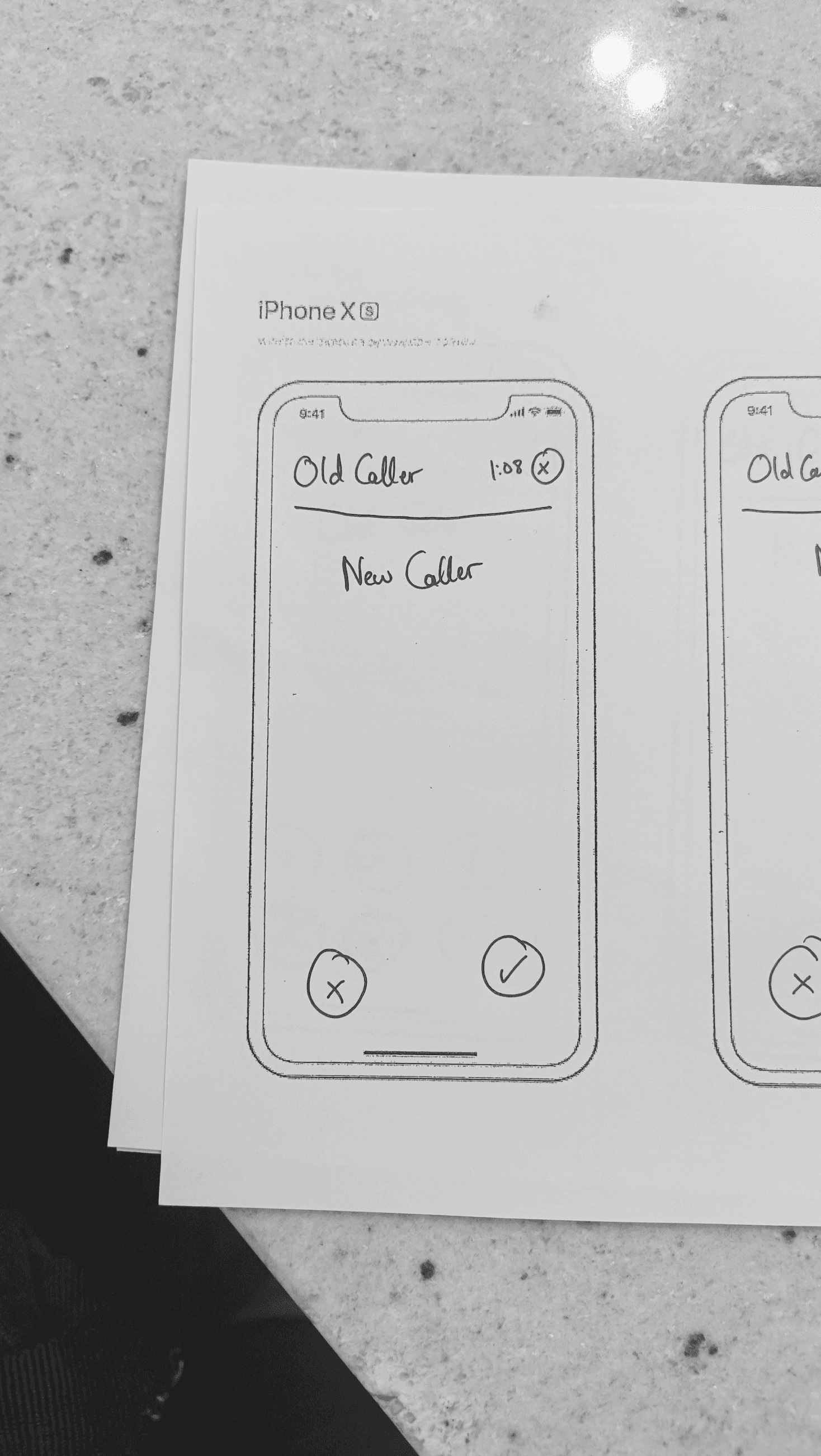
Pros
Sees both callers
Binary choice
In sync with the iOS’s one-caller-primary pattern
Familiar UI (Same as one call)
Cons
No Flexibility - No option of “End & Accept” and “Hold & Accept”
Heuristics
Caller Clarity
Simple Action Hierarchy
Consistency Across States
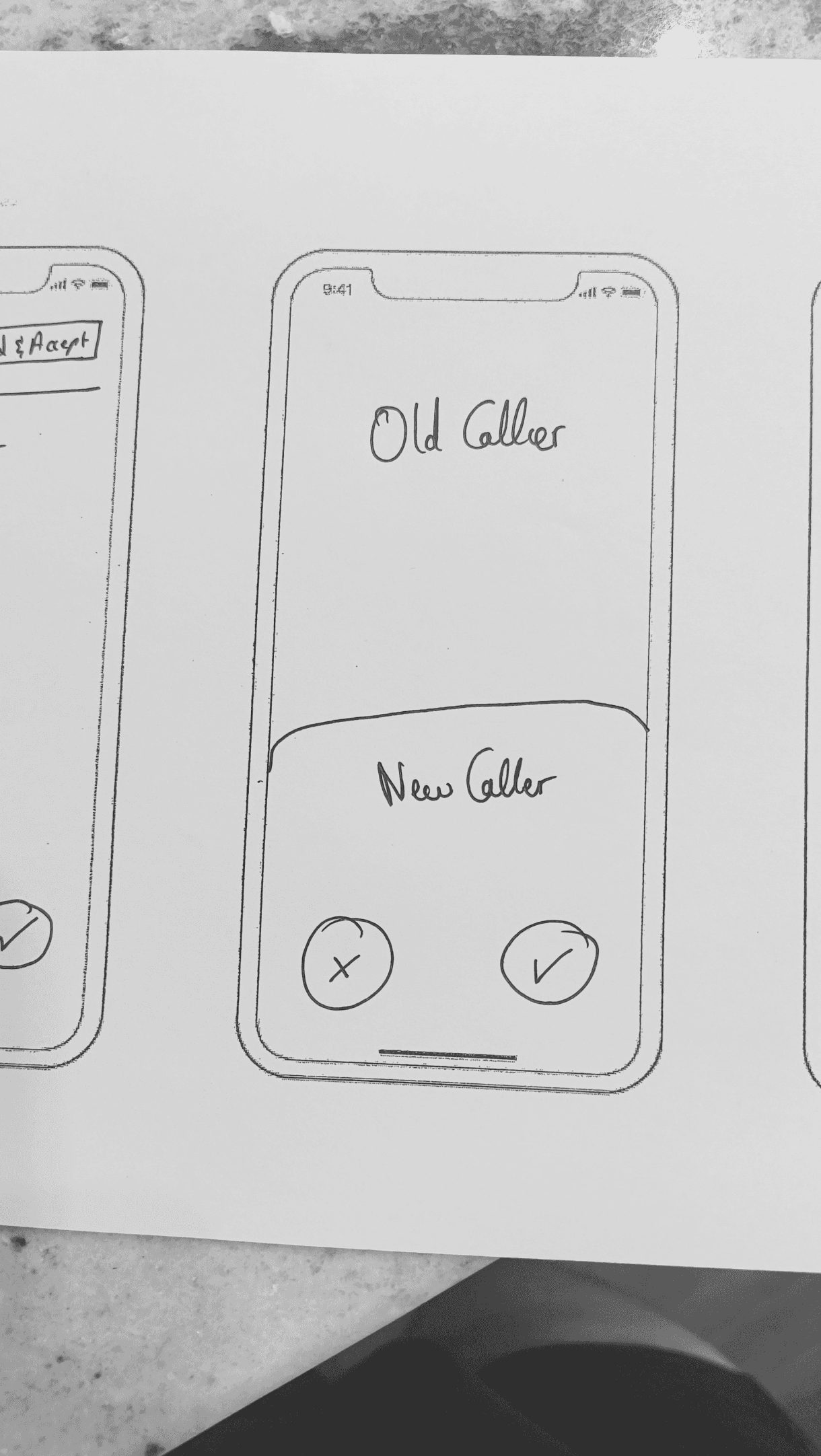
Pros
Sees both callers
Binary choice
In sync with the iOS’s one-caller-primary pattern
Familiar UI (Same as one call)
Cons
No Flexibility - No option of “End & Accept” and “Hold & Accept”
Not in sync with the iOS design language
Heuristics
Caller Clarity
Simple Action Hierarchy
Pros
Sees both callers
Does not lose functionalities of the old caller
Cons
Too many buttons increase cognitive load
No Clear Primary Caller
Unnatural division, makes user to “pick a side”
Not in sync with the iOS’s one-caller-primary pattern
Heuristics
Caller Clarity
Pros
Sees both callers
Cleaner layout than splitting the screen
Call controls stay in the same zone always
Cons
Sees controls only related to the old “current” caller, until choosing the new caller
Primary/Secondary hierarchy is unclear
Users wouldn’t know what controls does the new caller have until tapping on them
Not in sync with the iOS’s one-caller-primary pattern
Heuristics
Caller Clarity
Consistency Across States
Pros
Sees both callers
Binary choice
In sync with the iOS’s one-caller-primary pattern
Familiar UI (Same as one call)
Cons
No Flexibility - No option of “End & Accept” and “Hold & Accept”
Heuristics
Caller Clarity
Simple Action Hierarchy
Consistency Across States
Pros
Sees both callers
Binary choice
In sync with the iOS’s one-caller-primary pattern
Familiar UI (Same as one call)
Cons
No Flexibility - No option of “End & Accept” and “Hold & Accept”
Not in sync with the iOS design language
Heuristics
Caller Clarity
Simple Action Hierarchy
Pros
Sees both callers
Does not lose functionalities of the old caller
Cons
Too many buttons increase cognitive load
No Clear Primary Caller
Unnatural division, makes user to “pick a side”
Not in sync with the iOS’s one-caller-primary pattern
Heuristics
Caller Clarity
Pros
Sees both callers
Cleaner layout than splitting the screen
Call controls stay in the same zone always
Cons
Sees controls only related to the old “current” caller, until choosing the new caller
Primary/Secondary hierarchy is unclear
Users wouldn’t know what controls does the new caller have until tapping on them
Not in sync with the iOS’s one-caller-primary pattern
Heuristics
Caller Clarity
Consistency Across States
Pros
Sees both callers
Binary choice
In sync with the iOS’s one-caller-primary pattern
Familiar UI (Same as one call)
Cons
No Flexibility - No option of “End & Accept” and “Hold & Accept”
Heuristics
Caller Clarity
Simple Action Hierarchy
Consistency Across States
Pros
Sees both callers
Binary choice
In sync with the iOS’s one-caller-primary pattern
Familiar UI (Same as one call)
Cons
No Flexibility - No option of “End & Accept” and “Hold & Accept”
Not in sync with the iOS design language
Heuristics
Caller Clarity
Simple Action Hierarchy
Low Fidelity Idea #1
Low Fidelity Idea #1
Two solutions were chosen as the contenders that would move forward to the LoFi wireframe stage. In this stage we would created those ideas in a bit more details, understanding the user’s flow in a few screens. Ideally one of the contenders would move to the UI stage to be finalized and handed off to development.
Two solutions were chosen as the contenders that would move forward to the LoFi wireframe stage. In this stage we would created those ideas in a bit more details, understanding the user’s flow in a few screens. Ideally one of the contenders would move to the UI stage to be finalized and handed off to development.
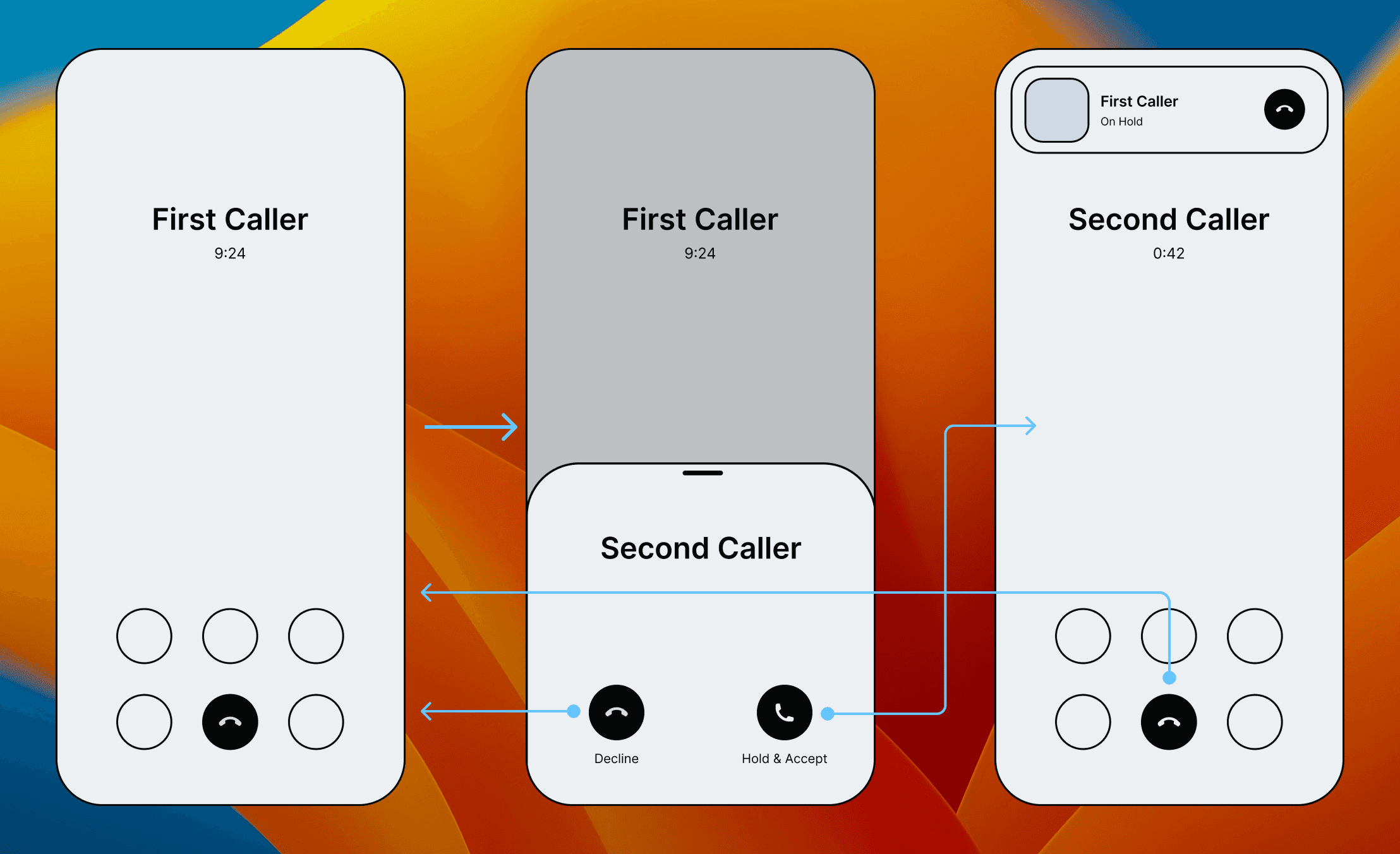
Here’s the standard iOS screen when a user is on a standard call. They have their main action button to End the call, and other secondary buttons that are not relevant in this study.
Here’s the standard iOS screen when a user is on a standard call. They have their main action button to End the call, and other secondary buttons that are not relevant in this study.
When they receive a second call, a sheet slides up from the button highlighting the second caller by casting an overlay on the main screen under it. The sheet covers up all actions related to the current caller hence concentrating the user on the task at hand: answer or decline the upcoming call.
When they receive a second call, a sheet slides up from the button highlighting the second caller by casting an overlay on the main screen under it. The sheet covers up all actions related to the current caller hence concentrating the user on the task at hand: answer or decline the upcoming call.
If the user answers the call, the first caller is put on hold and the call is minimized at the top. The card hints the user that the first call is on hold and has a chip for the user to end it at any time. The second call now takes the entirety of the screen and becomes the new focus of the user.
If the second call is declined, the user goes back to the first screen.
If the user answers the call, the first caller is put on hold and the call is minimized at the top. The card hints the user that the first call is on hold and has a chip for the user to end it at any time. The second call now takes the entirety of the screen and becomes the new focus of the user.
If the second call is declined, the user goes back to the first screen.
Design
Heuristics
Evaluation
Prioritize Caller Clarity
This option clearly articulates the first and the second caller at the appropriate time, always articulating to the user with which caller they are interacting with.
Simple Action Hierarchy
The actions in this flow remain simple and do not cause any cognitive load to the user. Although the first caller has 6 action buttons, the sheet that comes up with the second caller, hides all of that and proposes 2 simple actions.
Design Heuristic Evaluation
Action Unification
In this case we use iOS’s native “Accept” and “Decline” buttons, as creating a new unified component at this stage is not appropriate to do, since we have a strict deadline and an MVP is expected.
Consistency Across States
The use of the sheet that slides up, has a layout that is almost identical to the incoming call when a phone is unlocked, meaning that the familiar elements in their usual places ensures a quick response
Support Expectations
This flow behaves as user expect it in terms of putting on hold the current call to answer the second one, which is the primary flow of Android, as well as Landline. However users also expect an option to end the current and answer the new call, which is missing in this solution
Summary
This solution leverages sheets that slide over the existing UI to focus the user’s attention on the second caller. It simplifies the decision to a clear binary choice, which supports speed and clarity. However, by using the entire screen more effectively, we could also support the “End & Accept” option — a secondary but important action for many users. Addressing this need in the next iteration will help us balance simplicity with flexibility, and strengthen the overall solution.
This solution leverages sheets that slide over the existing UI to focus the user’s attention on the second caller. It simplifies the decision to a clear binary choice, which supports speed and clarity. However, by using the entire screen more effectively, we could also support the “End & Accept” option — a secondary but important action for many users. Addressing this need in the next iteration will help us balance simplicity with flexibility, and strengthen the overall solution.
Low Fidelity Idea #2
Low Fidelity Idea #2
Two solutions were chosen as the contenders that would move forward to the LoFi wireframe stage. In this stage we would created those ideas in a bit more details, understanding the user’s flow in a few screens. Ideally one of the contenders would move to the UI stage to be finalized and handed off to development.
Two solutions were chosen as the contenders that would move forward to the LoFi wireframe stage. In this stage we would created those ideas in a bit more details, understanding the user’s flow in a few screens. Ideally one of the contenders would move to the UI stage to be finalized and handed off to development.
Design
Heuristics
Evaluation
Prioritize Caller Clarity
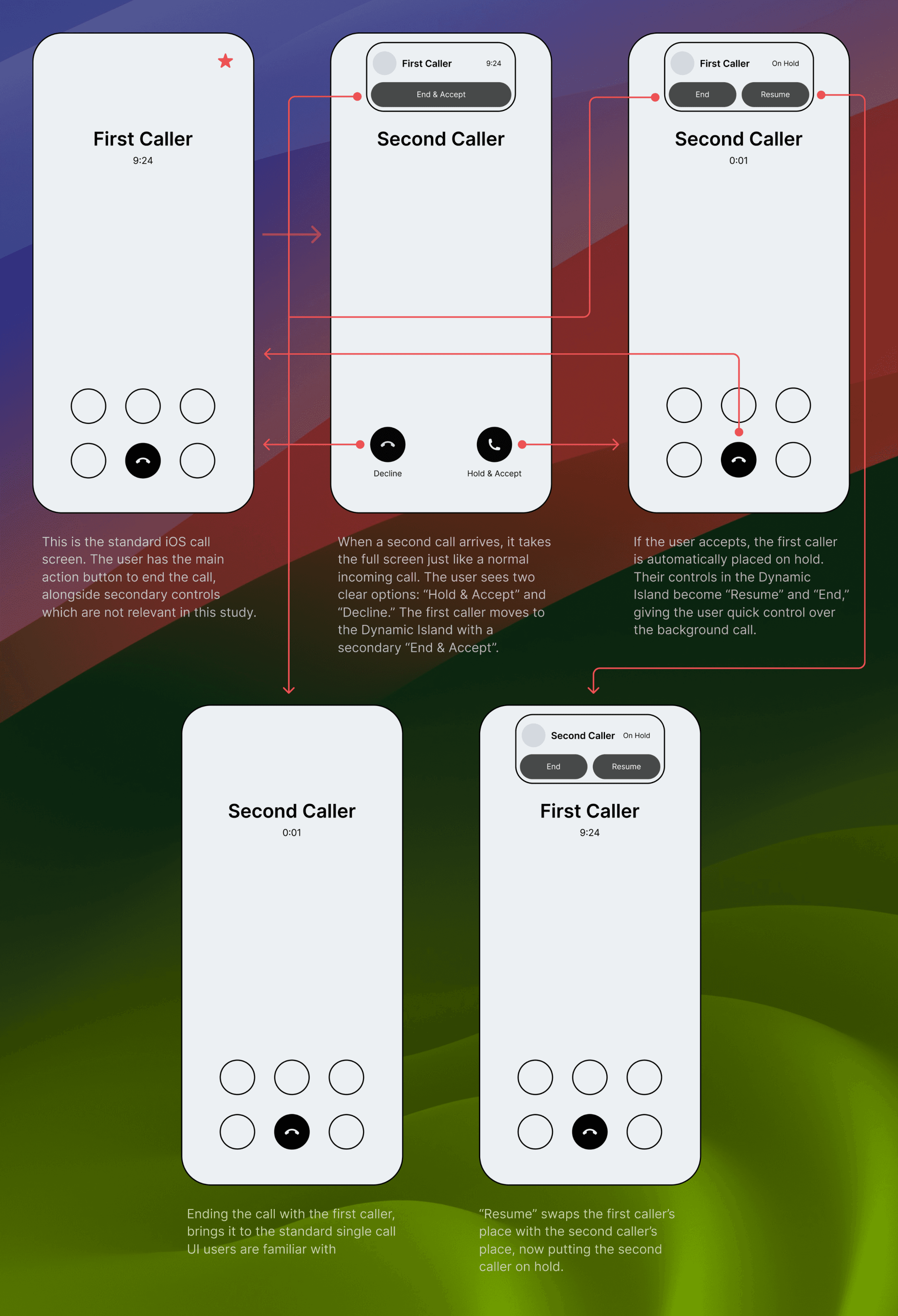
Although two callers may exist, only one is always the primary focus. The other is minimized into the Dynamic Island, reducing confusion and preventing split attention.
Simple Action Hierarchy
The solution reuses the same UI patterns users already know from single-call and incoming-call screens. This ensures smooth transitions and builds on muscle memory.
Design Heuristic Evaluation
Action Unification
Incoming second calls present three clear options, structured into primary (“Hold & Accept,” “Decline”) and secondary (“End & Accept”). The hierarchy keeps actions predictable and reduces cognitive load.
Consistency Across States
The design leverages iOS’s native buttons for “Accept” and “Decline” to meet MVP constraints and ensure speed of delivery. A new unified control could be explored in a future iteration.
Support Expectations
The flow mirrors real-world calling behavior and platform conventions: answering one call puts the other on hold, while secondary controls remain accessible in the Dynamic Island. This aligns with user mental models
Summary
This solution prioritizes clarity by always keeping one caller as the user’s primary focus at all times, and minimizes the other into the Dynamic Island to reduce confusion. Using familiar iOS call screens and patterns ensure consistency and quick action. The actions are split into primary – “Hold & Accept” and “Decline” and a secondary – “End & Accept” which covers user’s needs. The flow supports user expectations by mirroring real-world calling behavior and platform conventions: answering one call automatically places the other on hold, with secondary actions still accessible. Finally, by leveraging native iOS components, the design delivers an MVP-ready solution quickly, while leaving space to refine unified controls in future iterations.
This solution prioritizes clarity by always keeping one caller as the user’s primary focus at all times, and minimizes the other into the Dynamic Island to reduce confusion. Using familiar iOS call screens and patterns ensure consistency and quick action. The actions are split into primary – “Hold & Accept” and “Decline” and a secondary – “End & Accept” which covers user’s needs. The flow supports user expectations by mirroring real-world calling behavior and platform conventions: answering one call automatically places the other on hold, with secondary actions still accessible. Finally, by leveraging native iOS components, the design delivers an MVP-ready solution quickly, while leaving space to refine unified controls in future iterations.
UI & Prototyping
UI & Prototyping
After careful consideration and revision of the lofi wireframes, we came to the conclusion that the second option provided more value to our users, and targeted each and every one of the design heuristics, and took into consideration the problem statement
After careful consideration and revision of the lofi wireframes, we came to the conclusion that the second option provided more value to our users, and targeted each and every one of the design heuristics, and took into consideration the problem statement
To kick off the UI, we used our own Figma UI Kit, to keep everything consistent with the Apple language, and to have a swift transition into development. Although our UI Kit provides the guidelines and the atomic components, we had to create case-specific components to show visually what the solution components are, and to prototype to as real-life as possible with Figma.
To kick off the UI, we used our own Figma UI Kit, to keep everything consistent with the Apple language, and to have a swift transition into development. Although our UI Kit provides the guidelines and the atomic components, we had to create case-specific components to show visually what the solution components are, and to prototype to as real-life as possible with Figma.
Final Notes
Final Notes
This concludes this case study that was meant to provide a quick solution for the second caller screen, of course when implementing solutions like this, all other products of the ecosystem at Apple should be taken into consideration, however for this case study, our main focus was the iPhone.
This concludes this case study that was meant to provide a quick solution for the second caller screen, of course when implementing solutions like this, all other products of the ecosystem at Apple should be taken into consideration, however for this case study, our main focus was the iPhone.
Hope you liked this case study and if there are any questions feel free to contact me!
Hope you liked this case study and if there are any questions feel free to contact me!